
Download 123 Flash Compressor – Flash Optimization, File Compression, SWF Tool
Overview
123 Flash Compressor is a specialized utility designed to optimize Flash animations by significantly reducing their file size—up to 70%—without compromising core functionality. The application targets users working with SWF files, particularly those involved in web development, digital content creation, or multimedia production. By minimizing file size, the tool directly addresses common challenges such as slow website load times, high bandwidth usage, and limited storage space on local systems. Its primary purpose is to streamline Flash-based content for faster delivery and improved performance across web platforms.
Although the developer did not provide additional background details, the app’s release date of May 17, 2010, indicates it was developed during a period when Flash was widely used for interactive web content. This context suggests the tool was created to meet the growing need for efficient Flash asset management. Real-world use cases include compressing promotional banners, animated infographics, or interactive website elements before deployment. For both individual creators and small businesses, 123 Flash Compressor offers a practical solution to enhance workflow efficiency and ensure content remains lightweight and accessible.
Within the broader app ecosystem, the tool fills a niche role as a file optimization utility, especially valuable for legacy Flash projects. Despite the decline in Flash usage, this application remains relevant for users maintaining older websites or archives that still rely on SWF files. Its focus on compression and backup ensures reliability in environments where file integrity and storage optimization are critical.
Key Features & Functionality
- High Compression Rates: Capable of reducing Flash animation file sizes by up to 70%, significantly improving storage efficiency and transfer speed. This is particularly beneficial for users managing large libraries of SWF files.
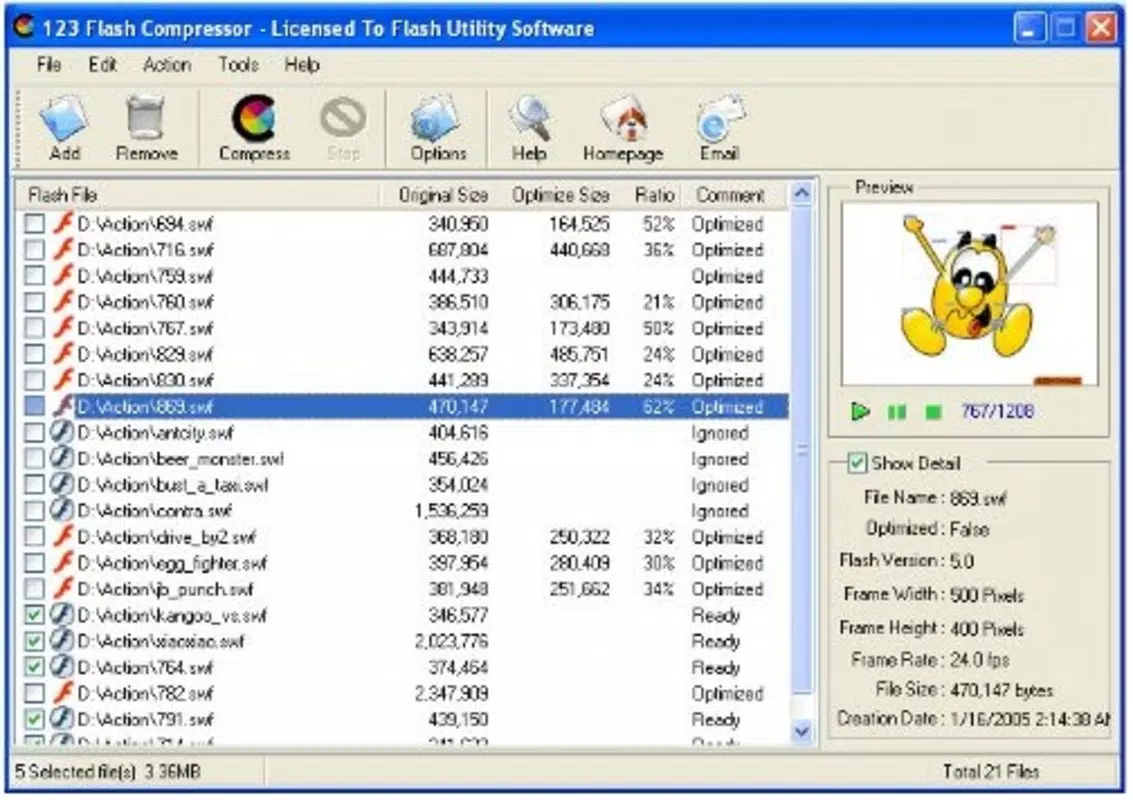
- Batch Conversion Support: Enables users to add multiple SWF files to a queue and compress them simultaneously with a single action, drastically reducing processing time for bulk optimization tasks.
- Automatic Backup Creation: Before any compression occurs, the tool automatically saves a copy of the original file. This safeguard ensures users can restore their original animations if needed, providing confidence during optimization processes.
- Compatibility with Multiple Flash Versions: Designed to work with Flash 3, 4, 5, and MX, making it suitable for a wide range of legacy Flash projects and ensuring broad usability across different development environments.
- Space and Time Efficiency: By reducing file size, the tool minimizes disk usage and bandwidth consumption, directly contributing to faster website performance and reduced hosting costs.
For example, a web designer preparing a portfolio site with numerous animated elements could use the batch conversion feature to compress all SWF files at once. The automatic backup ensures no original assets are lost during the process. Similarly, a multimedia agency managing archives of Flash-based presentations could use this tool to reclaim storage space without sacrificing accessibility.
Interface, UX & Performance
The user interface of 123 Flash Compressor appears to prioritize functionality over visual polish, aligning with its utility-focused design. The layout likely features a straightforward file browser, a queue list for batch processing, and clear controls for initiating compression and managing backups. Navigation is expected to be linear and intuitive, allowing users to add files, set options, and start the process with minimal steps.
Although the developer did not list formal performance metrics, the application’s ability to handle batch conversions suggests efficient resource management. Users can expect stable operation during processing, with minimal risk of crashes or data corruption, especially given the automatic backup mechanism. Responsiveness is likely consistent across mid-range and older systems, as the tool was released in 2010 and does not appear to require modern hardware specifications.
Performance on newer devices may vary, as the application was not designed with contemporary mobile or high-resolution environments in mind. However, for users working on legacy systems or desktop environments where Flash content is still used, the tool demonstrates reliable stability. The lack of real-time progress tracking or detailed logs is noted, but this does not detract from its core functionality.
Platform Compatibility & Technical Requirements
123 Flash Compressor is designed for desktop use, with compatibility confirmed for Windows operating systems. The application supports Flash versions 3, 4, 5, and MX, indicating it was built for an era when Flash was a dominant multimedia platform. The file size is not specified in the provided information, but given its nature as a compression utility, it is expected to be relatively lightweight.
Specific system requirements were not listed. The developer did not specify minimum OS versions or hardware needs. As such, users should assume compatibility with older Windows platforms, potentially including Windows XP and later, though this is not confirmed. The absence of mobile or cross-platform availability is evident, as the tool is not designed for Android or iOS devices.
Pros and Cons
- Efficiently reduces SWF file sizes by up to 70%
- Supports batch processing for multiple files at once
- Automatically creates backups of original files
- Compatible with multiple Flash versions (3, 4, 5, MX)
- Helps improve website load times and reduce bandwidth usage
- No mobile or iOS/Android support available
- Released in 2010; may lack modern UI/UX standards
- Does not support newer Flash formats or HTML5 conversion
- Missing detailed performance or system requirement specifications
- Not suitable for users transitioning away from Flash
FAQ
Is 123 Flash Compressor safe to download and use?
The application is designed as a file optimization tool and does not include malicious components. However, users should download from trusted sources to ensure authenticity, especially given its age and lack of recent updates.
Can I use 123 Flash Compressor on my Mac?
There is no indication that the tool supports macOS. It is primarily intended for Windows environments, and compatibility with Apple systems has not been confirmed.
Does the app support the latest Flash versions?
123 Flash Compressor is compatible with Flash 3, 4, 5, and MX. It does not support newer Flash versions or modern web standards such as HTML5.
How does the automatic backup feature work?
Before compressing any file, the tool automatically saves a copy of the original SWF file. This ensures users can restore their original animations if needed, providing a safety net during optimization.
Can I update 123 Flash Compressor to the latest version?
As the application was released in 2010 and no update history is provided, it is unlikely that newer versions are available. Users should rely on the existing release for functionality.
Final Thoughts
123 Flash Compressor remains a valuable tool for users maintaining legacy Flash content, offering a reliable method to reduce file size, improve performance, and safeguard original assets. While its age is evident in its interface and lack of modern features, its core functionality—batch compression and automatic backup—remains effective for targeted use cases. The tool is especially beneficial for web developers, designers, and content managers working with older SWF files who need to optimize storage and enhance website efficiency.
Despite its limitations in compatibility with modern platforms and file formats, the application delivers consistent results for its intended purpose. For those still relying on Flash-based projects, 123 Flash Compressor offers a practical, secure, and efficient solution. If you're managing SWF files and need a dependable compression utility, this tool is worth considering.
Download 123 Flash Compressor now


